Trackman Golf: what does it measure, how to read the data, and which model to choose?
If you want to get more out of your session than just an impressive trajectory on the screen, start with a few of the most important data points: club path, face angle, swing plane, low point, carry, ball speed, or spin rate. Do not judge a swing based on a single shot and do not try to copy "Tour numbers."
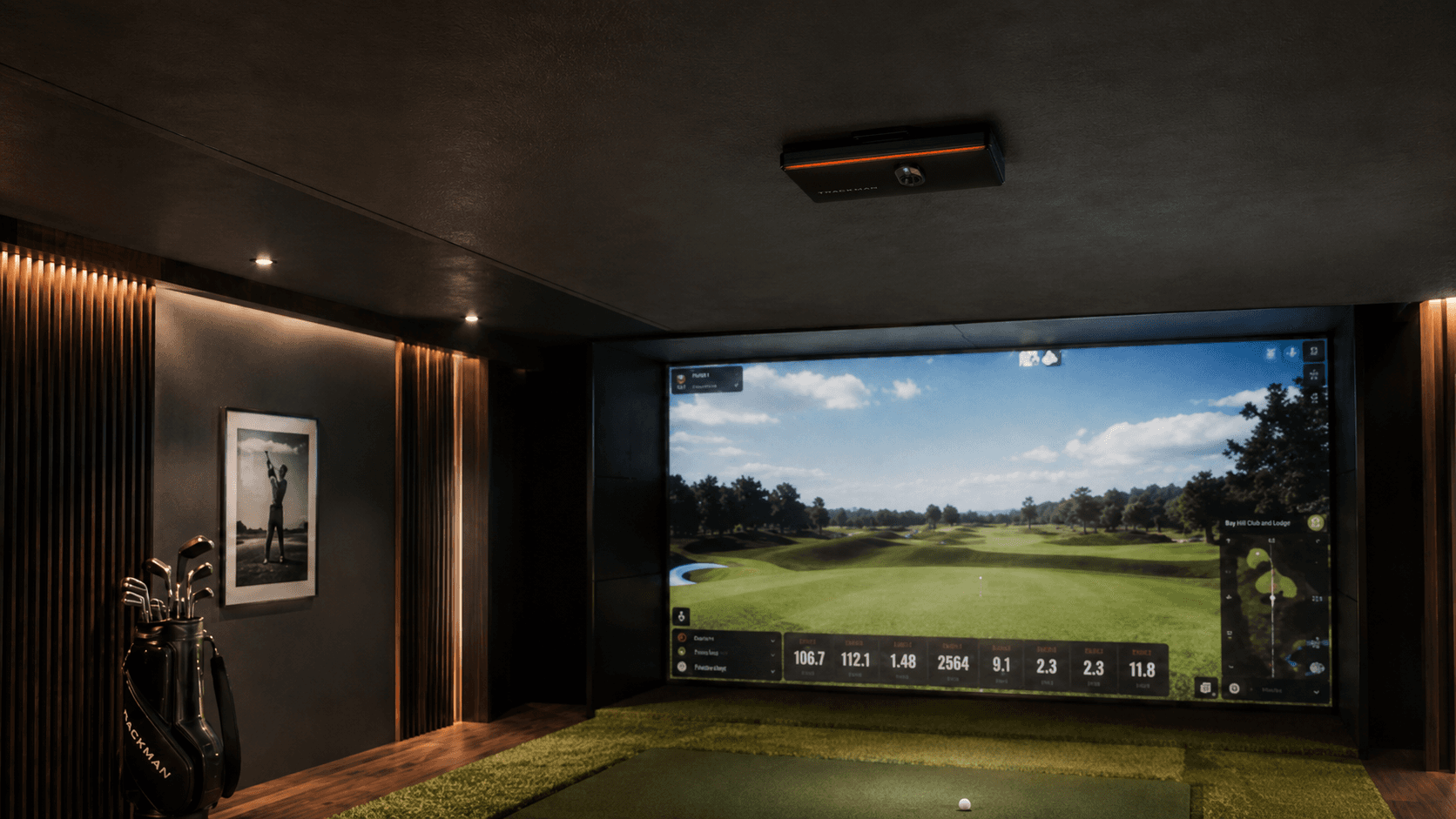
Choosing a device is simpler than the catalogs suggest. The Trackman 4 makes sense when you need mobility and both outdoor and indoor functionality. The Trackman iO is a permanent ceiling-mounted device designed for indoor simulator rooms. Both models are used for analysis and simulation, but they are not the same device in a different casing.
What is the Trackman brand in golf?
Trackman golf is an ecosystem of devices and software for shot measurement, training, fitting, and playing on virtual courses. In this article, the word "Trackman" refers to the brand and its golf launch monitors - primarily Trackman 4 and Trackman iO - and not the Logitech computer trackball of a similar name.
Trackman 4 utilizes OERT (Optically Enhanced Radar Tracking) technology: two synchronized radar systems and optics. One system focuses on the club, impact, and putting area, while the second tracks ball flight. Trackman iO also uses OERT but is optimized for indoors: it combines a 24 GHz radar, two cameras, including a high-speed camera, and infrared light. Details of both configurations are published by the manufacturer in the technical specifications of Trackman 4 and Trackman iO.
This distinction has practical significance. On an open driving range, Trackman 4 can observe the actual ball flight path for a longer period. Indoors, the ball hits the screen or net after a few meters, so the remaining trajectory must be calculated from the initial conditions. Trackman iO was designed specifically for this scenario and measures movement in the impact zone from above.
What does Trackman really say about a shot?
Trackman data is divided into club parameters, ball parameters, and flight results. A number on the screen only makes sense when you know which group it belongs to.
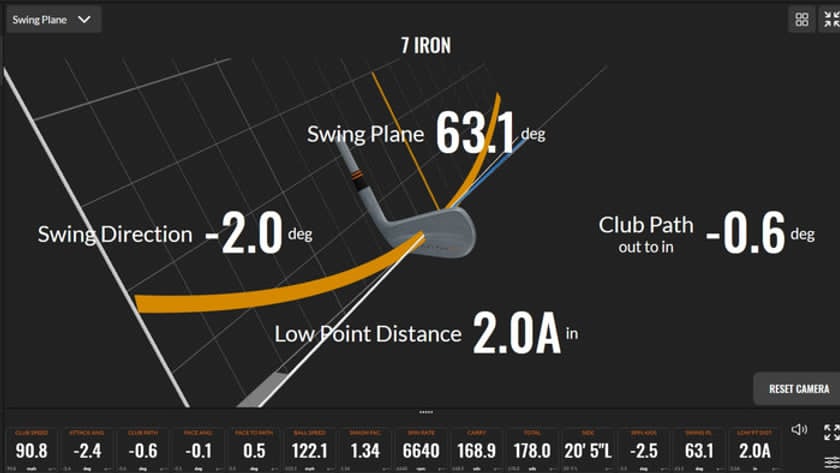
The manufacturer publishes precise definitions in the 40+ Trackman parameters glossary. The below list is not the entire catalog. These are the parameters that most often help a golfer make a decision.
Parameter | What it means | How to use it | What not to draw from it |
Ball speed | The velocity of the ball's center immediately after separating from the clubface | Evaluate together with club speed and contact location | A high value alone does not tell you if the ball went in the right direction |
Club speed | The speed of the geometric center of the clubhead just before contact | Helps evaluate the ball speed potential | It is not an evaluation of technique or contact quality |
Smash factor | Ball speed divided by club speed | It is a quick indicator of energy transfer in a given shot | Do not blindly compare different clubs and lofts; "more" is not always the only goal |
Launch angle | The vertical angle of the ball's takeoff relative to the horizon | Combine with spin, speed, and carry | This is not attack angle |
Launch direction | The direction in which the ball starts its flight relative to the target line | Shows the start of the ball | This is not club path or final deviation |
Spin rate | The number of rotations of the ball per unit of time | Evaluate with launch angle, ball speed, height, and landing angle | There is no single ideal value for every player and every club, however, spin ranges can be established as points of reference |
Spin axis | The tilt of the spin axis describing the ball's tendency to curve | Helps read the curvature of the flight | Does not indicate by itself why the contact yielded such a result |
Carry | The straight-line distance to the point where the ball's path crosses the launch height level | This is the baseline number for mapping club distances | Does not add roll after landing |
Total | The calculated distance to where the ball comes to a stop | Useful in game simulation | Depends on assumed ground and roll conditions; use carry more often for distance control |
Landing angle | The angle at which the ball descends to the level corresponding to the launch height | Important for evaluating green-stopping ability, especially with irons | The angle alone does not replace information about spin, speed, and green surface |
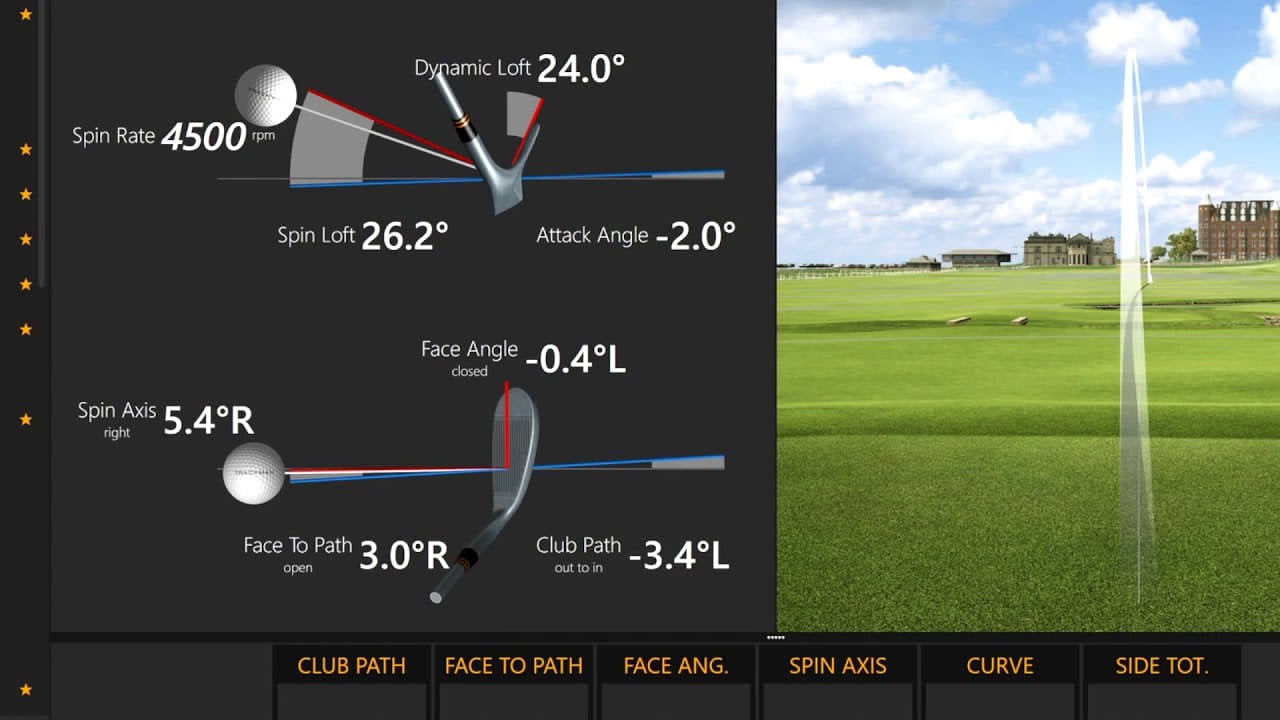
Face angle | The direction the clubface is pointing at the point of contact with the ball | Read with launch direction and club path | It is not the path of the clubhead's movement |
Club path | The direction of movement of the geometric center of the clubhead at impact | Read with face angle and face-to-path | A positive or negative value is not automatically "good" or "bad" |
Face-to-path | The difference between face angle and club path | Helps explain the curvature tendency | It is not the launch direction of the ball |
Attack angle | The upward or downward movement of the clubhead at the moment of maximum compression | Useful when working on the driver, irons, and contact control | It is not the launch angle of the ball |
Dynamic loft | The vertical angle of the face at the point of contact during maximum compression | Combine with attack angle, spin loft, and ball flight | This is not the loft stamped on the clubhead |
It is worth keeping the methodology in mind. Trackman reports club speed, attack angle, and club path relative to the geometric center of the clubhead, whereas face angle and dynamic loft refer to the orientation of the face at the point of contact. This is one of the reasons why numbers from different measurement systems are not always comparable one-to-one. The manufacturer explains this difference in the Club Data Definitions material.
How to read Trackman data without guessing?
First check contact and ball launch, then curvature, trajectory, and distance. The reverse order often ends up treating the symptom instead of the cause.
The practical order of analysis looks like this:
Establish the task. Choose the club, target, and shot type. A full driver and a controlled wedge cannot share the same definition of a "good result."
Check contact quality. Look at impact location, ball speed, and consistency of the result. With an off-center hit, even a correct path can produce a different flight due to the gear effect on a wood-type head.
Check the start line. Compare launch direction and face angle with the target line.
Check the curvature. Compare face-to-path, spin axis, and actual curve. Do not diagnose a slice/hook solely based on club path.
Check the flight window. Read launch angle, spin rate, height, and landing angle together.
Finally, evaluate the result. Carry, side, and dispersion of the session are more important than a single record-breaking shot.
This sequence is not a law of physics or an official manufacturer protocol. It is an editorial method for organizing sessions, based on the relationship between club data and flight results. If you are changing your swing, do it with a coach who can distinguish correlation in data from biomechanical cause.
How to use Trackman to train with a driver, irons, or wedges?
You do not need all the parameters at once. Choose a set of numbers that corresponds to the specific task.
Driver: look for a functional flight, not a record on the screen
For the driver, observe ball speed, launch angle, spin rate, carry, and dispersion. Club data - club speed, face angle, club path, face-to-path, attack angle, and impact location - helps explain the result.
Do not optimize a single number in a vacuum. Low spin is not automatically good if the ball does not maintain a stable flight. A high launch is not good if it comes at the expense of speed or control. The longest shot of the session does not have to be the best: on the course, what matters is the distance you can repeat within an acceptable corridor.
Irons: control carry, launch, and landing angle
With irons, carry is usually more useful than total. The ball needs to reach the planned point and stop in a predictable way. Therefore, evaluate the series by carry, side, launch direction, spin rate, height, and landing angle. For contact diagnosis, add attack angle, low point, dynamic loft, and impact location.
Do not assume that a steeper attack angle always means better contact. What matters is the relationship between the low point of the arc, ball position, dynamic loft, impact location, and the task of the shot.
Wedges: build a distance yardage map
In wedge training, Trackman is particularly useful for mapping carry. Instead of chasing maximum spin, build repeatable distances for several swing lengths and lofts (e.g., the Pelz method). Observe the median or typical result of the series, carry dispersion, and how launch angle, spin, and landing angle change.
If you are training off a mat, remember that it does not replicate every club interaction with natural ground. Good numbers off a mat do not eliminate the need to check contact control on grass.
Trackman indoor: what to watch out for?
A good indoor measurement does not mean the room removes course physics. The ball, mat, screen, configuration, and assumed conditions affect how you should interpret the session.
The most important limitations are practical:
The ball: worn-out range balls and premium balls do not behave identically. To compare sessions, use the same model and a similar ball condition.
Spin in a radar system: with Trackman 4, the manufacturer recommends Titleist RCT balls with a radar-reflective layer as a solution to facilitate accurate indoor spin capture without manually placing a marker. This does not apply in the same way to Trackman iO, which according to current specifications directly measures 3D spin with cameras and does not require markers. Source: Trackman and Titleist on RCT balls.
The mat: can change the club's reaction upon turf contact. Be especially cautious when interpreting irons and wedges after shots that on grass would have been hit too early (the club hitting the ground first instead of the ball - "fat").
Total distance: further flight and roll in the simulator are based on a model and set conditions. For club mapping, rely primarily on carry and dispersion.
Environmental conditions: the Normalization feature in TPS allows you to adjust for the impact of wind, altitude, and temperature. Normalized data is not a record of the weather at the moment of the shot, but an answer to the question "what would this flight look like in selected conditions?". Source: Trackman Support — Normalization & Optimizer.
Safety and room geometry: the lack of a minimum measurement path for iO does not mean any room is suitable for a full swing. You need a safe zone for the player, club, screen, ball rebound, and projector operation.
Trackman 4 or Trackman iO?
Choose Trackman 4 if the device needs to travel and also work outdoors. Choose Trackman iO if you are building a permanent indoor station and want to free up floor space behind the player.
Criterion | Trackman 4 | Trackman iO |
Main environment | indoor and outdoor | indoor only |
Technology | OERT, two radar systems and optics | OERT, 24 GHz radar, two cameras, and infrared |
Installation | device placed behind the player in the line of play | permanent ceiling mount above the hitting station |
Mobility | yes; battery: 4 hours or more according to the manufacturer | no; installation solution |
Measurement space | in indoor configuration, the manufacturer specifies a minimum of 3m from the device to the net | the manufacturer does not specify a minimum measurement path; space for a safe swing is needed, however, for a good reading, there should be at least about 2.5m of ball flight |
Putting | Performance Putting and Simulator Putting | Simulator Putting |
Best scenario | coach, fitter, academy, player, range and studio work | home or commercial simulator designed from the ground up as indoor |
Important caveat | requires space behind the player and proper indoor configuration | access to some club data depends on the variant/license; check the current package before purchasing |
Specifications and licensing scopes are subject to change. Before planning a project, check the manufacturer's current technical table, rather than basing decisions on an old review or the device logo alone.
Where does Trackman Range fit into all this?
Trackman Range is a solution for driving ranges, not a third version of the portable launch monitor. The system tracks shots across the facility and provides players with data and games via screens or an app. For the user, the key is the ability to save activities and return to data in the Trackman Golf app. For the facility owner, it is a separate infrastructure project and an outstanding summary in numbers.
If the article is ultimately intended to target keywords related to Trackman Range as well, it is better to prepare a separate piece of content for B2B intent and link it to this page. Expanding on the range topic here would dilute the answer to the golfer's main question.
Most common mistakes during a Trackman session
1. "Club path tells you where the ball will launch"
No. Club path describes the direction of the clubhead's movement. Launch direction reports the start direction, and face angle describes the alignment of the face. All this data is connected, but not interchangeable.
2. "Positive path is good, negative is bad"
Without information on dexterity, intended shot shape, face angle, and impact location, such a verdict is meaningless. The parameter describes movement; it does not hand out grades.
3. "The highest smash factor wins"
Smash factor is the ratio of two speeds. It helps diagnose energy transfer, but does not describe direction, flight window, dispersion, or green-stopping ability.
4. "Total is my club distance"
Total includes modeled roll. To plan a shot over an obstacle and map your bag, first get to know carry and its dispersion.
5. "One session gives me my true numbers"
A change in ball, mat, warm-up, temperature, normalization settings, or target can alter the result. Compare series played in similar conditions and record the context.
6. "Trackman will tell me how to rebuild my swing on its own"
Data describes an event. Deciding to change technique requires a goal, observing patterns, and — for major interventions — a competent coach. More numbers do not replace a better diagnosis.
Will Trackman help an amateur?
Yes, if the amateur uses it to answer a specific question. No, if they are just collecting numbers.
The most practical applications for a club golfer are:
establishing the actual carry of each club;
finding distance gaps in the bag;
controlling launch direction and dispersion;
checking if equipment changes improve the series result, not just a single shot;
wedge distance training;
maintaining play consistency in winter;
playing on virtual courses regardless of the weather.
Trackman is a measurement tool. Its value does not increase with the number of parameters on the screen, but with the quality of the question you ask before the series.
How to plan a simulator with Trackman?
First you choose the usage pattern, then the device. A home simulator for regular play, a fitting studio, and a commercial facility have different requirements regarding dimensions, acoustics, turf, screen, projector, ventilation, and handling right- and left-handed players.
Golf Masters designs complete golf simulators, not just the installation of the launch monitor itself. Before deciding, you can also compare the most important radars and launch monitors, check alternatives for a home simulator, and view completed golf simulator projects.
If you have a blueprint and room dimensions, send them over before our conversation. This will allow us to immediately rule out configurations that would be uncomfortable or unsafe, and compare Trackman 4 with iO in a real layout, rather than based on a sales brochure.
FAQ: Trackman Golf
Is Trackman a radar or a camera?
Trackman 4 and Trackman iO combine radar and optics in OERT technology. Trackman 4 uses two radar systems and optics, while iO uses a 24 GHz radar, a dual-camera system, and infrared light. The configurations serve different work environments.
What is the difference between carry and total on Trackman?
Carry describes the flight distance to the point corresponding to the launch height. Total adds the calculated behavior of the ball after landing until it comes to a stop. For mapping clubs and evaluating carries over hazards, carry is more important.
What is more important: face angle or club path?
This is a misplaced question. Face angle and club path describe different elements of impact. Read them together with face-to-path, launch direction, spin axis, and impact location to understand the launch and curvature of the ball.
Does face-to-path mean the direction of the ball flight?
No. Face-to-path is the difference between the face alignment and the clubhead path. The ball's initial direction is reported by launch direction, and its subsequent curvature is described by spin axis and curve.
Does Trackman indoor yield the same results as outdoor?
The device measures launch conditions, but in indoor environments, the ball quickly hits the screen and the remaining flight is simulated. The result and interpretation are also affected by ball type, mat, configuration, and set weather conditions. Compare sessions conducted in the same environment.
Does Trackman 4 require a lot of room space?
According to current manufacturer specifications, the distance from Trackman 4 to the screen/net in an indoor setup should be at least 3m. To this, you must add safe space for the player and swing, as well as a radar-to-ball distance of 2.1-2.4m. The design must be evaluated as a whole.
Does Trackman iO require markers on the ball or club?
The manufacturer's current specifications state that iO does not require markers on the ball or club. However, the scope of available club data depends on the solution version/license, so you should check the current offer before purchasing.
Trackman 4 or Trackman iO for home?
If the device is to remain permanently in the simulator room, then only Trackman iO. If you want to take the system to the range and work outdoors, Trackman 4 is the right candidate. The final decision depends on dimensions and usage patterns.
Is it worth comparing your data with PGA Tour averages?
Only as context, not as a universal goal. A different speed, club, ball, conditions, and intended shot shape alter the optimal parameter window. First, build your own baseline of repeatable results.
Does Trackman replace a coach?
No. Trackman measures and organizes data. A coach combines it with the swing image, player's goal, physical limitations, and change plan. A good tool strengthens the diagnosis; it does not automatically create it.
Sources
Editorial note: product parameters and license variants are subject to change. Specifications verified on July 19, 2026.

Level up your game
Let's meet
Design office:
1 Górnośląska St.,
00-443 Warsaw
Showroom:
Golf green - book an appointment
Chabrowa 2 St.,
62-053 Borkowice
Write
Email address